


Crosswords With Friends
3.712.86K Reviews
App Specs
- Version
- 51.34.3076
- Updated On
- License
- Free
- Downloads
- 1,000,000+
- Developer
- Zynga
- Categories
- Word
- Platform
- Android
Screenshots


 Analysis by AppCompare
I like word games that fit into the small gaps of a day, and a crossword is especially satisfying when I can pause to think instead of racing through a level. Crosswords With Friends is built around that steady rhythm, pairing crossword solving with a daily theme and a social angle. In my experience, its strongest appeal is not a pile of complicated modes; it is having a familiar puzzle ready when I want a short, focused break.
Reading the grid and finding your way around
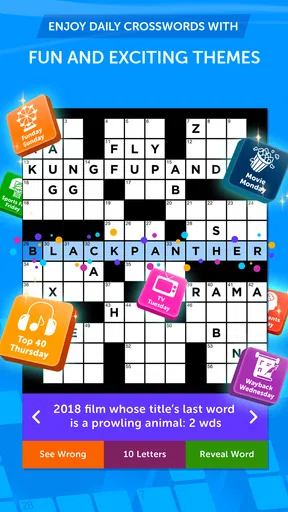
The first thing I notice in a crossword app is whether I can understand the grid without fighting the screen. Here, the layout feels direct: I tap a square, enter a letter, and move through the puzzle. The option to focus on a whole word or a single letter is useful when I want to check the shape of an answer before committing to it. That makes the basic interaction approachable even if someone is new to solving crosswords on a phone.
The daily theme also gives each puzzle a useful starting point. If a clue feels vague, I can keep the theme in mind and look for a connection rather than treating every answer as an isolated fact. I find that especially helpful when I am solving casually and do not want to stop and research every unfamiliar clue. A theme can guide a guess, but it does not remove the need to work through crossings, which is part of what keeps the puzzle satisfying.
Navigation is uncomplicated enough for short visits, but a small screen still changes the experience. I would rather solve with the phone held comfortably and take a moment to select the intended square than tap quickly and lose my place. If you often play on a compact device, it is worth trying a few clues before deciding whether the grid feels comfortable for longer sessions.
Touch, pace, and sensory comfort
Crosswords are naturally less dependent on rapid reactions than many mobile games, and that is a genuine advantage here. I can think through a clue at my own pace, pause between entries, and return when I have more attention. The tap-to-type approach is easy to understand, though anyone who finds precise touch selection tiring may still prefer a larger screen or a physical keyboard when one is available.
Appearance options can make the board feel more personal, and changing a theme or color scheme may help someone choose a look that is easier for them to follow. I would treat that as a practical adjustment rather than assume every combination will suit every reader. Before settling into a long session, I would test the available presentation choices and see whether letters, selected squares, and empty spaces remain easy to distinguish in the lighting where I usually play.
The game’s relaxed pace is not the same as a guarantee of sensory comfort. A person who is sensitive to busy screens, interruptions, or competitive prompts should pay attention to how the app feels during an actual session. I like that solving itself can be quiet and deliberate, but the social and event elements may be less appealing to someone who wants nothing beyond a plain, uninterrupted grid.
Worth Reading Before You Choose

EA SPORTS FC Mobile 26 Is a Bigger Football Game, but It Takes Time

Flipboard Shows What News Apps Must Do Beyond the Feed

Switching to Android Auto Means Rethinking Your Driving Routine

Google Calendar Makes a Crowded Week Easier to Manage

Ludo King Makes the Most of the Minutes Between Plans

Baby Panda World Brings Quick Play to Modern Phones, but Its Game Library Feels Busy
Where it fits into an ordinary day
A realistic use for me is opening a puzzle while waiting for an appointment or taking a break between tasks. I can solve a few clues, leave the harder ones for later, and use the theme to get my thoughts moving again. It works better for that kind of stop-and-start leisure than a game that expects a long stretch of concentration or quick responses.
The daily structure is also handy if you want a small routine: one puzzle can become a morning coffee habit or a way to wind down without committing the whole evening. I would not treat it as a replacement for a printed crossword if I enjoy writing notes in the margins or spreading a large puzzle across a table. On a phone, the benefit is portability; the trade-off is that the grid and clue list share limited space.
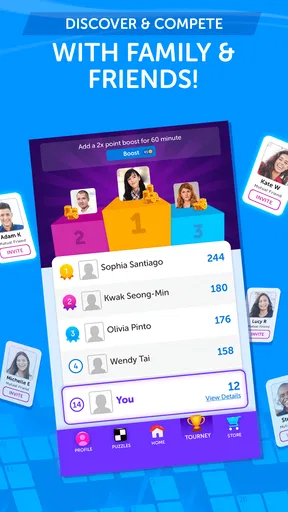
The social option suits friends who already enjoy comparing answers. A low-pressure way to use it is to solve independently first, then compare how quickly each person finished or which clue caused the most trouble. That gives the competitive feature a friendly purpose without turning every session into a contest. If you do not want to connect with other players, the core appeal remains the puzzle itself, so the social angle need not be the reason to try it.
How the daily crossword plays
Once you download Crosswords With Friends, the setup is as easy as pie. Just open the app, and you're greeted with a clean, intuitive interface. The design is straightforward, making it easy to dive right into your first puzzle. No tedious sign-ups or confusing menus here—just pure crossword fun.
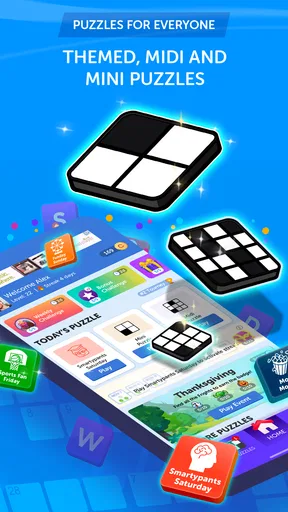
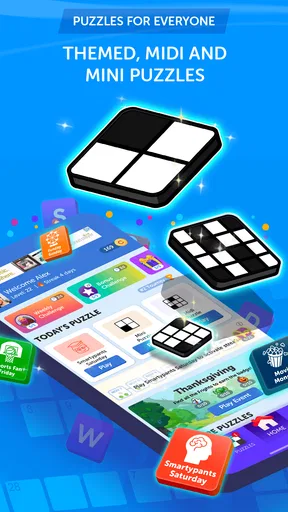
The daily puzzles are the main attraction, and they are themed, which adds a little extra flavor to your wordplay. From pop culture to history, each day brings a new challenge, ensuring you never get bored. I found myself eagerly waiting for the next day's theme, curious to see what quirky topics would pop up next.
The Gameplay Experience
Playing a crossword on a touch screen is a surprisingly smooth experience. The controls are intuitive—just tap the box you want to fill, and start typing. The app even lets you highlight entire words or individual letters, which comes in handy when you're stuck on a tricky word. And let’s be honest, who hasn’t been there?
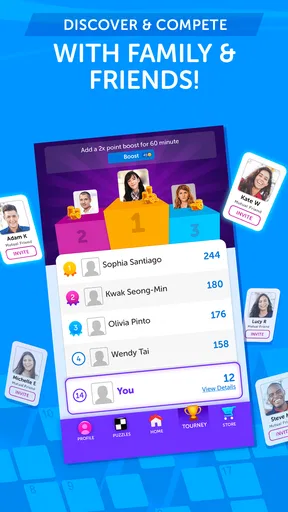
One of my favorite features is the social aspect. You can connect with friends and challenge them to see who can complete puzzles faster. It’s a great way to add a competitive edge and keep things lively. Plus, it’s always fun to have some friendly banter over who had the tougher puzzle of the day.
Features That Stand Out
Besides the daily puzzles, the app offers various features that enhance the overall experience. There are special events and bonus puzzles, which are perfect for those days when you just can’t get enough. The hint system is also pretty generous, allowing you to nudge yourself in the right direction without spoiling the entire puzzle. Trust me, it’s a lifesaver for those brain-freeze moments.
Another nifty feature is the option to customize the game’s appearance. You can choose different themes and color schemes, which is a small but nice touch. It makes the game feel more personal and engaging.
Using hints without losing the fun
I get the most from a hint when I use it as a last nudge rather than the first response to a difficult clue. I try the crossings, think about the daily theme, and then ask for help if I am still stuck. That keeps the answer feeling earned while preventing one obscure word from stopping the whole grid. If you are playing to learn, pausing before using a hint can also reveal which kinds of clues you tend to misread.
There is a trade-off, of course: hints make a puzzle more approachable, but leaning on them too quickly can take away the satisfaction of solving. I would use them selectively, especially if the goal is to challenge myself. For a tired evening or a quick break, using a nudge sooner may be the better choice; the point is to enjoy the puzzle, not turn every clue into a test.
Who will enjoy it, and who may not
This is a good fit for people who already like wordplay, want a regular crossword to return to, or enjoy comparing progress with friends. It can also suit a newer solver who appreciates having hints available and does not mind learning by trial and error. The themed format gives casual players a foothold, while the crossings still reward patience and vocabulary.
I would look elsewhere if I wanted a large archive of puzzles as the main attraction, a completely solitary experience, or a paper-like solving setup with room to annotate. Likewise, someone who dislikes touchscreens or finds small grids uncomfortable may have a better time with a tablet, a printed puzzle, or another format designed around a larger display. The social layer is a bonus for the right person, not a reason everyone should choose this game.
Compared with a basic crossword app that simply presents a grid, this one puts more emphasis on a daily theme and sharing the challenge. That can make it feel lively and give friends a reason to return, while a plain puzzle collection may be preferable for someone who wants to choose from many grids at their own pace. The best choice depends on whether a recurring shared routine matters more to you than browsing a broad selection.
Practical details and fair expectations
Created by Zynga, this free word game is rated for Everyone and has reached over a million installs. Its average rating is 3.7 from around 37,000 ratings, with about 13,000 written reviews. Those figures suggest plenty of people have tried it, but I would not use popularity as a substitute for checking whether its daily rhythm and social style suit me.
The game’s current version is 51.27.2902, and it runs on Android 6.0 or later. It includes optional in-app purchases ranging from $0.99 to $59.99 per item, so I would check the purchase details shown in the app before spending. The free entry point makes it easy to see whether the crossword format works for you, but it is sensible to keep purchases deliberate, particularly if you are handing a device to a child.
One remaining friction is that a themed daily puzzle can feel repetitive if you play consistently and prefer constant novelty. The original attraction—a familiar grid and a regular solving habit—is also the reason it may not satisfy someone looking for a new mechanic every time. I would decide after several sessions rather than one: notice whether the themes keep you curious, whether the grid remains comfortable, and whether the social features add anything you actually value.
Keeping Up with the Competition
Crosswords With Friends stacks up well against other crossword apps. The daily themes and social interactions set it apart from the others. While some apps might bombard you with ads, this one strikes a balance, allowing you to focus on the puzzles without constant interruptions.
However, I did notice that some of the puzzles can be a bit repetitive if you play consistently. But then again, the charm lies in the simplicity and the joy of solving, not necessarily in reinventing the wheel.
A considered recommendation
For me, the strongest reason to try it is the combination of a daily crossword, accessible hints, and the option to share the challenge with friends. I would recommend it to someone who likes a gentle routine and wants wordplay that can be picked up for a few minutes at a time. I would not recommend choosing it solely for variety, a silent solo atmosphere, or a spacious puzzle experience; those needs point toward a different kind of crossword.
In a nutshell, if you're looking for a fun, engaging, and slightly competitive way to enjoy crosswords, this app is a no-brainer. Crosswords With Friends delivers a satisfying mix of challenge and entertainment, all wrapped up in a sleek package. Whether you’re a crossword newbie or a seasoned pro, this app has something for everyone.
So, go ahead, give it a whirl, and see if you can out-puzzle your pals. Happy puzzling!
Pros
- Daily puzzles keep the game fresh.
- Variety of themes adds fun diversity.
- Social features enhance interaction.
- Hints available for tricky clues.
- User-friendly interface for all ages.
Cons
- Requires internet for daily puzzles.
- Ads can be intrusive at times.
- Limited free hints available.
- No offline mode for puzzle play.
- In-app purchases can be pricey.
FAQs for Crosswords With Friends
What is Crosswords With Friends?
Crosswords With Friends is a popular puzzle game available on Android and iOS that offers daily crossword challenges crafted by a team of top crossword constructors. Each puzzle is themed around pop culture, sports, and entertainment, making it both fun and engaging for players of all ages.
Is Crosswords With Friends free to play?
Yes, Crosswords With Friends is free to download and play. However, it does offer in-app purchases for additional features such as removing ads or purchasing hints. Players can enjoy the game without spending money, but these options can enhance the experience.
Can I play Crosswords With Friends offline?
Crosswords With Friends requires an internet connection to download new puzzles and access certain features. While you can work on a puzzle offline if it has already been downloaded, a connection is necessary for daily updates and to engage with social features.
Are there social features in Crosswords With Friends?
Yes, Crosswords With Friends includes several social features. Players can connect with Facebook to see how their scores compare with friends, challenge friends to beat their times, and share achievements. It’s a great way to add a competitive edge to the game.
What are the main benefits of playing Crosswords With Friends?
Playing Crosswords With Friends can help improve vocabulary, problem-solving skills, and cognitive abilities. The daily puzzles keep your mind engaged and the themed challenges offer a fun way to learn about various topics. It's both entertaining and mentally stimulating, appealing to a wide range of players.


